

구현 목표
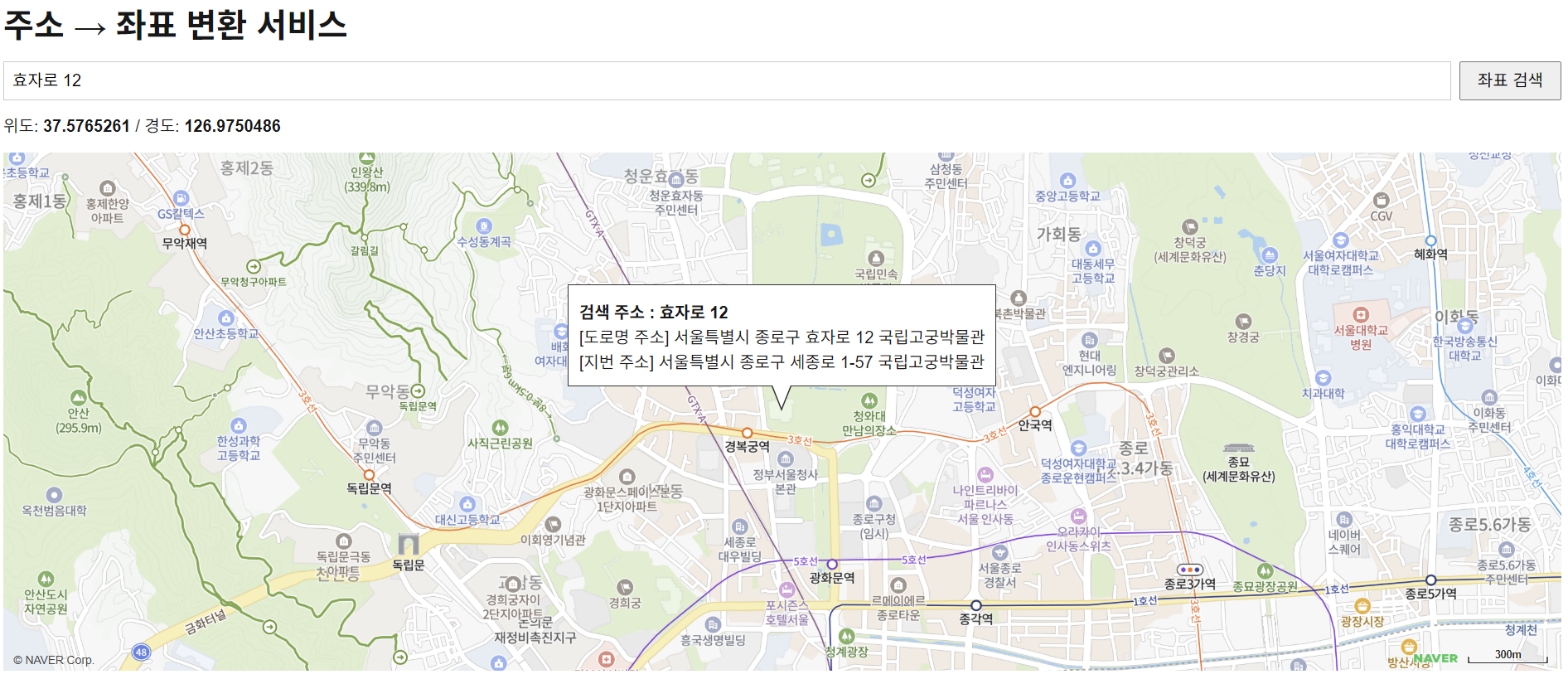
입력 창에 주소를 입력하여 검색하면 해당 주소의 좌표로 이동하고,
지도를 클릭하면 해당 지점의 좌표로 주소를 검색하는 기능을 만들었다.
기능 구현을 위해 Naver Maps API의 Dynamic Map, Geocoding, Reverse Geocoding 기능을 사용했다.
네이버 클라우드 플랫폼 Application 등록

사용할 API를 선택해서 Application을 등록한다.
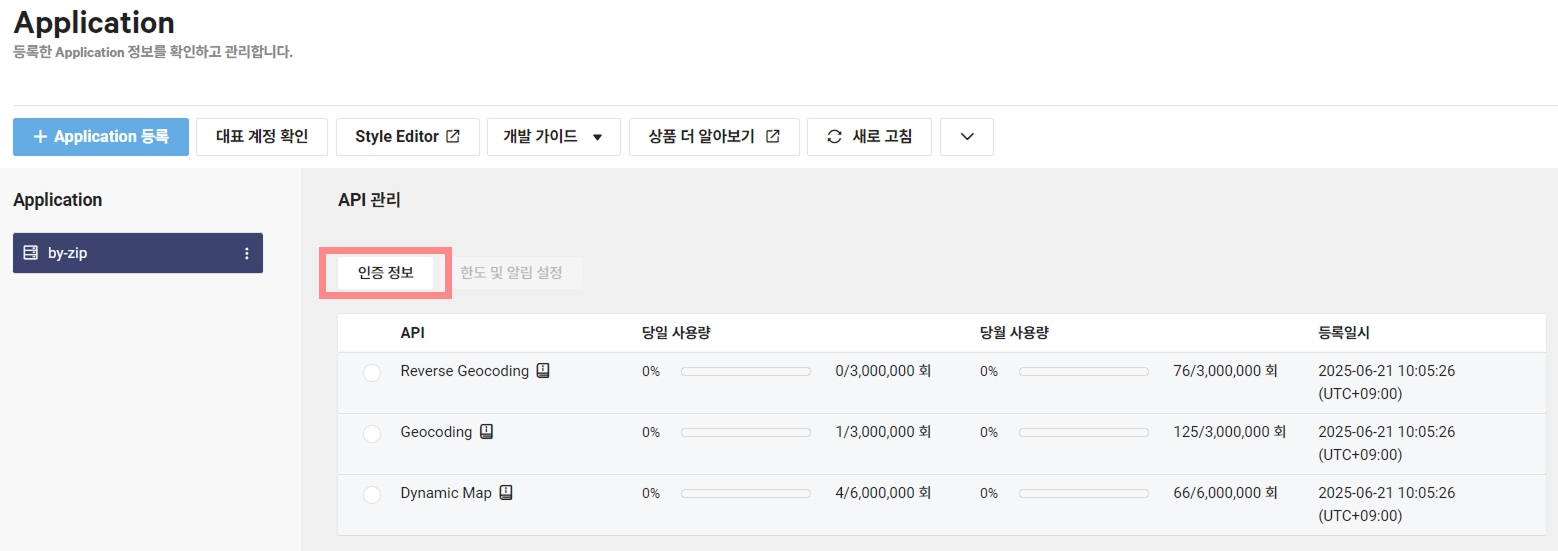
생성된 Application에서 [인증 정보] 버튼을 클릭한다.
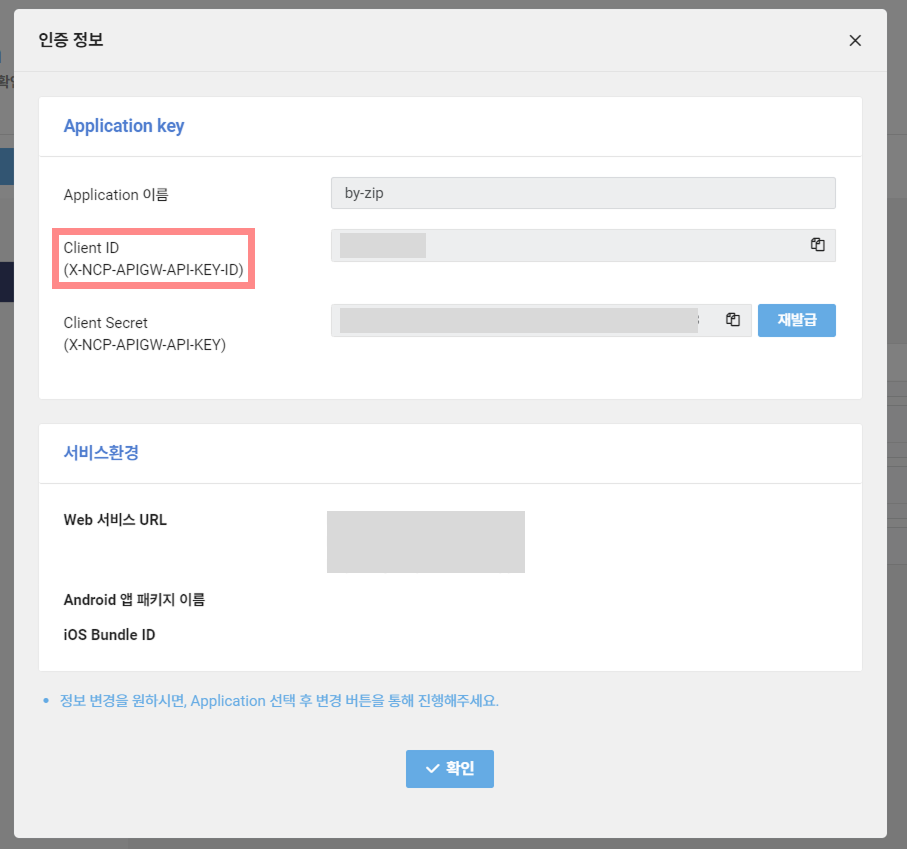
NEXT_PUBLIC_NAVER_CLIENT_ID=발급받은_ID인증 정보에 있는 클라이언트 ID를 `.env`에 다음과 같이 저장했다.
구현 코드
타입스크립트 사용 준비
npm i -D @types/navermapsNAVER Maps API 타입 정의 파일을 설치해야 한다.
지도 로드하기
"use client";

import { useRef, useState } from "react";
import Script from "next/script";

export default function MapPage() {
  const mapRef = useRef<naver.maps.Map | null>(null);
  const infoRef = useRef<naver.maps.InfoWindow | null>(null); // infoWindow

  const [address, setAddress] = useState("");
  const [coords, setCoords] = useState<{ lat: number; lng: number } | null>(
    null
  );

  // 지도 초기화
  const initializeMap = () => {
    const map = new naver.maps.Map("map", {
      center: new naver.maps.LatLng(37.3595316, 127.1052133),
      zoom: 15,
    });

    mapRef.current = map;
    infoRef.current = new naver.maps.InfoWindow({ content: "" });

    // 지도 클릭 시 마커 이동 및 좌표 표시
    map.addListener("click", (e: any) => {
      const latlng = e.coord;
      setCoords({ lat: latlng.y, lng: latlng.x });
      searchCoordinateToAddress(latlng);
    });
  };

  return (
    <Script
      strategy="afterInteractive"
      src={`https://oapi.map.naver.com/openapi/v3/maps.js?ncpKeyId=${process.env.NEXT_PUBLIC_NAVER_CLIENT_ID}&submodules=geocoder`}
      onReady={initializeMap}
    />
  );
}
`Script` 컴포넌트의 `onReady` 속성을 이용해 네이버 지도 스크립트가 성공적으로 로드된 이후에
`initializeMap()`을 호출해서 안전하게 지도를 생성한다.
참고로 Geocoder를 사용하려면 `src`에 서브 모듈까지 추가해야 한다.
주소로 좌표 검색하기
  // 주소 검색 시 좌표로 변환
  const searchAddressToCoordinate = () => {
    if (!address.trim()) return;

    naver.maps.Service.geocode({ query: address }, (status, response) => {
      if (status === naver.maps.Service.Status.ERROR) {
        alert("주소를 찾을 수 없습니다.");
        return;
      }

      if (response.v2.meta.totalCount === 0) {
        alert("주소를 찾을 수 없습니다.");
        return;
      }

      const item = response.v2.addresses[0];
      const point = new naver.maps.LatLng(
        parseFloat(item.y),
        parseFloat(item.x)
      );

      mapRef.current?.setCenter(point);
      setCoords({ lat: parseFloat(item.y), lng: parseFloat(item.x) });

      const htmlAddresses = [];

      if (item.roadAddress) {
        htmlAddresses.push(`[도로명 주소] ${item.roadAddress}`);
      }

      if (item.jibunAddress) {
        htmlAddresses.push(`[지번 주소] ${item.jibunAddress}`);
      }

      // infoWindow 내용 생성
      const htmlContent = `
        <div style="padding:10px;min-width:200px;line-height:150%;">
          <h4 style="margin-top:5px;">검색 주소 : ${address}</h4>
          ${htmlAddresses.join("<br />")}
        </div>
      `;

      infoRef.current?.setContent(htmlContent);
      infoRef.current?.open(mapRef.current!, point);
    });
  };
`naver.maps.Service.geocode()` 함수를 호출한다.
좌표로 주소 검색하기
  // 지도 클릭 시 해당 위치 좌표로 변환
  const searchCoordinateToAddress = (latlng: naver.maps.LatLng) => {
    naver.maps.Service.reverseGeocode(
      {
        coords: latlng,
        orders: [
          naver.maps.Service.OrderType.ADDR, // 행정동
          naver.maps.Service.OrderType.ROAD_ADDR, // 지번 주소
        ].join(","),
      },
      (
        status: naver.maps.Service.Status,
        response: naver.maps.Service.ReverseGeocodeResponse
      ) => {
        if (status === naver.maps.Service.Status.ERROR) {
          alert("좌표를 찾을 수 없습니다.");
          return;
        }

        const items = response.v2.results;
        if (!items.length) return;

        const htmlAddresses: string[] = [];

        items.forEach((item) => {
          const addrType =
            item.name === "roadaddr" ? "[도로명 주소]" : "[지번 주소]";
          const address =
            item.region.area1.name +
            " " +
            item.region.area2.name +
            " " +
            item.region.area3.name +
            " " +
            item.region.area4.name +
            " " +
            (item.land.number1 ? " " + item.land.number1 : "") +
            (item.land.number2 ? "-" + item.land.number2 : "") +
            (item.land.addition0?.value ? " " + item.land.addition0.value : "");

          htmlAddresses.push(`${addrType} ${address}`);
        });

        // infoWindow 내용 생성
        infoRef.current?.setContent(`
          <div style="padding:10px;min-width:200px;line-height:150%;">
            <h4 style="margin-top:5px;">검색 좌표</h4>
            ${htmlAddresses.join("<br />")}
          </div>
        `);
        infoRef.current?.open(mapRef.current!, latlng);
      }
    );
  };
`naver.maps.Service.reverseGeocode()` 함수를 호출한다.
전체 코드
"use client";

import { useRef, useState } from "react";
import Script from "next/script";
import styles from "@/app/styles/Map.module.scss";

export default function MapPage() {
  const mapRef = useRef<naver.maps.Map | null>(null);
  const infoRef = useRef<naver.maps.InfoWindow | null>(null); // infoWindow

  const [address, setAddress] = useState("");
  const [coords, setCoords] = useState<{ lat: number; lng: number } | null>(
    null
  );

  // 지도 초기화
  const initializeMap = () => {
    const map = new naver.maps.Map("map", {
      center: new naver.maps.LatLng(37.3595316, 127.1052133),
      zoom: 15,
    });

    mapRef.current = map;
    infoRef.current = new naver.maps.InfoWindow({ content: "" });

    // 지도 클릭 시 마커 이동 및 좌표 표시
    map.addListener("click", (e: any) => {
      const latlng = e.coord;
      setCoords({ lat: latlng.y, lng: latlng.x });
      searchCoordinateToAddress(latlng);
    });
  };

  // 주소 검색 시 좌표로 변환
  const searchAddressToCoordinate = () => {
    if (!address.trim()) return;

    naver.maps.Service.geocode({ query: address }, (status, response) => {
      if (status === naver.maps.Service.Status.ERROR) {
        alert("주소를 찾을 수 없습니다.");
        return;
      }

      if (response.v2.meta.totalCount === 0) {
        alert("주소를 찾을 수 없습니다.");
        return;
      }

      const item = response.v2.addresses[0];
      const point = new naver.maps.LatLng(
        parseFloat(item.y),
        parseFloat(item.x)
      );

      mapRef.current?.setCenter(point);
      setCoords({ lat: parseFloat(item.y), lng: parseFloat(item.x) });

      const htmlAddresses = [];

      if (item.roadAddress) {
        htmlAddresses.push(`[도로명 주소] ${item.roadAddress}`);
      }

      if (item.jibunAddress) {
        htmlAddresses.push(`[지번 주소] ${item.jibunAddress}`);
      }

      // infoWindow 내용 생성
      const htmlContent = `
        <div style="padding:10px;min-width:200px;line-height:150%;">
          <h4 style="margin-top:5px;">검색 주소 : ${address}</h4>
          ${htmlAddresses.join("<br />")}
        </div>
      `;

      infoRef.current?.setContent(htmlContent);
      infoRef.current?.open(mapRef.current!, point);
    });
  };

  // 지도 클릭 시 해당 위치 좌표로 변환
  const searchCoordinateToAddress = (latlng: naver.maps.LatLng) => {
    naver.maps.Service.reverseGeocode(
      {
        coords: latlng,
        orders: [
          naver.maps.Service.OrderType.ADDR, // 행정동
          naver.maps.Service.OrderType.ROAD_ADDR, // 지번 주소
        ].join(","),
      },
      (
        status: naver.maps.Service.Status,
        response: naver.maps.Service.ReverseGeocodeResponse
      ) => {
        if (status === naver.maps.Service.Status.ERROR) {
          alert("좌표를 찾을 수 없습니다.");
          return;
        }

        const items = response.v2.results;
        if (!items.length) return;

        const htmlAddresses: string[] = [];

        items.forEach((item) => {
          const addrType =
            item.name === "roadaddr" ? "[도로명 주소]" : "[지번 주소]";
          const address =
            item.region.area1.name +
            " " +
            item.region.area2.name +
            " " +
            item.region.area3.name +
            " " +
            item.region.area4.name +
            " " +
            (item.land.number1 ? " " + item.land.number1 : "") +
            (item.land.number2 ? "-" + item.land.number2 : "") +
            (item.land.addition0?.value ? " " + item.land.addition0.value : "");

          htmlAddresses.push(`${addrType} ${address}`);
        });

        // infoWindow 내용 생성
        infoRef.current?.setContent(`
          <div style="padding:10px;min-width:200px;line-height:150%;">
            <h4 style="margin-top:5px;">검색 좌표</h4>
            ${htmlAddresses.join("<br />")}
          </div>
        `);
        infoRef.current?.open(mapRef.current!, latlng);
      }
    );
  };

  return (
    <>
      <Script
        strategy="afterInteractive"
        src={`https://oapi.map.naver.com/openapi/v3/maps.js?ncpKeyId=${process.env.NEXT_PUBLIC_NAVER_CLIENT_ID}&submodules=geocoder`}
        onReady={initializeMap}
      />
      <div className={styles.wrapper}>
        <h1 className={styles.title}>주소 → 좌표 변환 서비스</h1>

        <div className={styles.searchBox}>
          <input
            type="text"
            value={address}
            placeholder="주소를 입력하세요"
            onChange={(e) => setAddress(e.target.value)}
          />
          <button onClick={searchAddressToCoordinate}>좌표 검색</button>
        </div>

        {coords && (
          <p className={styles.coords}>
            위도: <strong>{coords.lat}</strong> / 경도:{" "}
            <strong>{coords.lng}</strong>
          </p>
        )}

        <div id="map" className={styles.map} />
      </div>
    </>
  );
}
결과물
